admin
admin 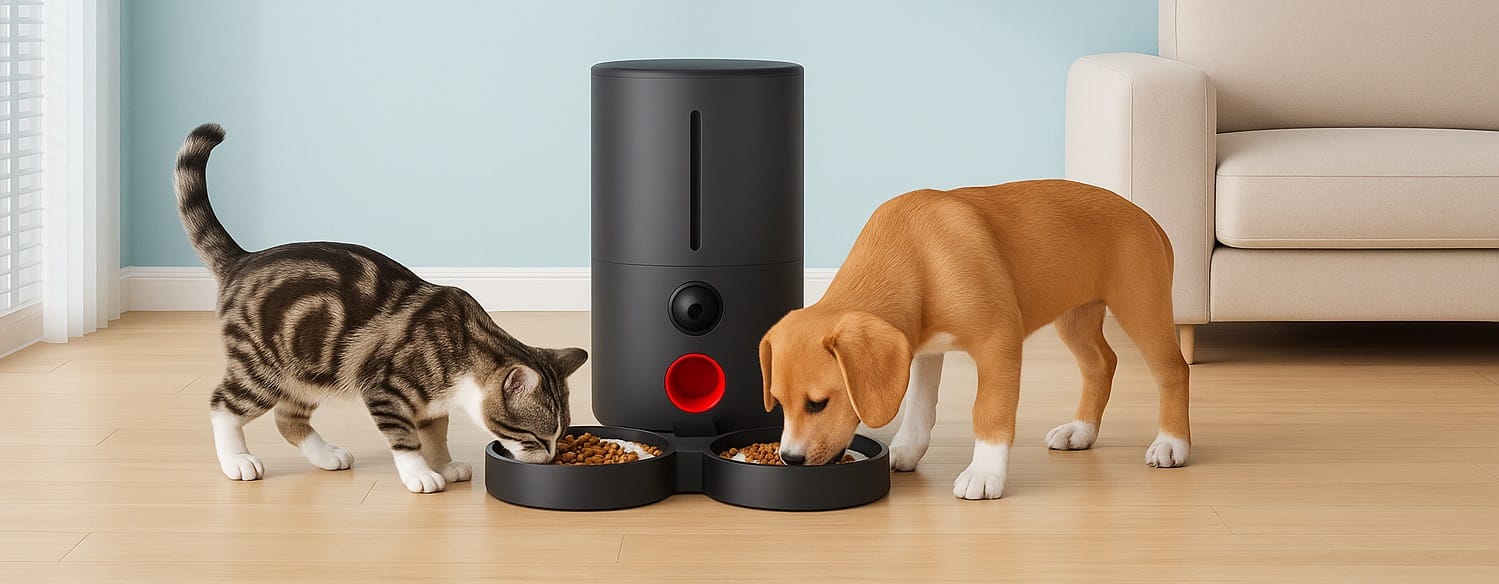
Understanding WOPET Automatic Pet Feeders
As pet owners, ensuring our beloved companions receive the appropriate nutrition at the right times can sometimes feel like a challenge. Enter the WOPET automatic pet feeder, an innovative solution designed to simplify feeding routines while enhancing the well-being of our pets. These feeders provide a practical way to deliver precise portion sizes at scheduled intervals, catering to the needs of both dogs and cats alike.
What is an Automatic Pet Feeder?
An automatic pet feeder is a device that dispenses a pre-set amount of food at scheduled times, allowing pet owners to control their pets’ meals without being physically present. WOPET’s range includes models with advanced features such as Wi-Fi connectivity, mobile app control, and programmable feeding schedules. This technology caters to the increasingly busy lifestyles of pet owners, ensuring pets do not miss a meal even when their owners are not home.
Key Features of WOPET Automatic Pet Feeders
WOPET automatic pet feeders come equipped with several key features designed for optimal user convenience and pet care:
- Programmable Feeding Schedules: Most models allow you to set specific feeding times and portions, accommodating individual dietary needs.
- Wi-Fi Connectivity: Select models include Wi-Fi capability, enabling remote operation via smartphone apps.
- Large Food Hoppers: Many feeders feature spacious hoppers, reducing the frequency of refills—ideal for busy owners.
- Portion Control: Precise portion sizes can be programmed, helping to manage your pet’s weight effectively.
- User-Friendly Interfaces: The setup process is straightforward, allowing even the least tech-savvy owners to navigate easily.
Benefits for Pet Owners and Pets
WOPET automatic pet feeders offer numerous advantages not only for pet owners but also for their furry friends:
- Convenience: Automating feeding schedules relieves the stress of rushing home for meal times.
- Regularity: Routine feeding fosters better eating habits, contributing to digestive health.
- Weight Management: With portion control, it becomes easier to monitor and manage your pet’s weight.
- Peace of Mind: Remote monitoring capabilities allow owners to check in on their pets and adjust feedings as necessary.
Choosing the Best WOPET Automatic Pet Feeder
With various models available, choosing the right WOPET automatic pet feeder involves evaluating specific needs and features that align with your pet’s requirements.
Factors to Consider When Selecting a Feeder
When deciding which WOPET feeder is right for you, consider the following factors:
- Pet Size: The size and dietary needs of your pet should dictate your choice in hopper size and portion control capabilities.
- Feeding Frequency: Determine how many meals per day your pet requires to select a feeder that accommodates those needs.
- Feeder Type: Decide between gravity-fed and electronically programmed feeders based on your preference for automation.
- Additional Features: Determine if you want advanced features like camera integration or voice recording for calling your pet at feeding time.
Comparison of Different WOPET Models
WOPET offers a variety of automatic pet feeders tailored for different needs. Here’s a brief look at some popular models and their distinguishing features:
- Patrol Automatic Pet Feeder: Equipped with a large 6L capacity, this model allows scheduling of up to 15 meals and supports a Wi-Fi connection for remote feeding.
- Sprite Automatic Feeder: With a 4L capacity, it is ideal for small dogs or cats, offering up to 4 meal settings with ease of use.
- Barn Pet Feeder: Designed with dual trays, this flexible feeder can cater to simultaneous feeding for multiple pets.
User Reviews and Experiences
Feedback from users highlights the reliability and efficiency of WOPET automatic feeders. Many customers emphasize the peace of mind that comes with automated feeding and the benefits of monitoring their pets’ eating habits. Common praises involve the ease of setup and the responsive customer service provided by WOPET.
Setting Up Your WOPET Automatic Pet Feeder
Unboxing and Initial Setup
Setting up your WOPET automatic pet feeder is a straightforward process. Inside the package, you’ll typically find the feeder, a user manual, and any necessary attachments. Begin by thoroughly cleaning the parts before first use, as this promotes hygiene. Follow the steps outlined in the manual to assemble, ensuring that the hopper, dispensing mechanism, and bowl are securely fitted.
Connecting to Wi-Fi and App Integration
For models with Wi-Fi capability, connect the feeder to your home network following the instructions in the app. Download the WOPET app, create an account, and follow the prompts to pair your feeder. This feature allows you to control feeding schedules and monitor your pet remotely.
Feeding Schedule Customization
Once connected, you can customize your pet’s feeding schedule directly through the app. Determine meal times and portion sizes based on your pet’s specific needs. Most users find it beneficial to start with smaller portions and adjust as necessary, considering the pet’s activity level and dietary needs.
Maintaining Your WOPET Automatic Pet Feeder
Regular Cleaning and Maintenance Tips
To ensure optimal performance and hygiene, regular maintenance of your WOPET feeder is essential. Here are some best practices:
- Clean the Bowl: Remove and wash the food bowl regularly with warm, soapy water to eliminate any residue or bacteria.
- Check for Clogs: Periodically inspect the dispensing mechanism for any blockages, especially if you notice issues with feeding.
- Monitor Battery Life: If your feeder runs on batteries, replace them as needed to avoid unexpected shutdowns.
How to Troubleshoot Common Issues
Even the best devices can have occasional issues. Here are some common problems and their solutions:
- Feeder Not Dispensing: Check if the hopper is full, and ensure that the dispensing mechanism isn’t jammed or clogged.
- Connectivity Issues: If you experience problems with Wi-Fi connectivity, check your router’s signal strength and re-pair the feeder using the app.
- Portion Control Problems: If the portions seem off, revisit the app settings to confirm your programmed amounts.
When to Consider a Replacement or Upgrade
Assess whenever your feeder continues to fail or does not meet your needs. Additionally, if you acquire another pet or your current pet’s dietary requirements change significantly, upgrading to a model with more features or a larger capacity might be prudent.
Maximizing Your Pet’s Health with a WOPET Feeder
Ideal Portion Sizes for Different Breeds
Understanding the ideal portion sizes for different breeds is crucial. Larger breeds, such as Labradors, may require more significant portions, while smaller breeds like Chihuahuas need considerably less. As a guideline:
- Small Breeds: ~ ¼ to ½ cup of food per meal.
- Medium Breeds: ~ 1 to 1½ cups of food per meal.
- Large Breeds: ~ 2 to 3 cups of food per meal.
Consult your vet to determine specific dietary needs and ensure proper weight management.
Combining the Feeder with Other Feeding Strategies
While an automatic feeder can streamline meal times, consider combining it with other feeding strategies for balanced nutrition. For instance, you may choose to use the feeder for dry kibble while offering wet food or treats manually to enhance variety. Properly integrating these will help keep your pet engaged with their meal time.
Monitoring Your Pet’s Eating Habits
Utilize the monitoring capabilities of the WOPET feeder to track your pet’s eating habits. Take note of any significant changes in appetite, as they can signal health issues. Additionally, regular monitoring can help prevent overeating and optimize your feeding strategy.